
Download AmeeLa – AI Logo Design Tool for Startups
Overview of AmeeLa – Streamlined Logo Design for Startups
AmeeLa positions itself as a fast‑track solution for entrepreneurs who need a professional‑looking logo without hiring a designer or learning complex design software. Powered by an AI‑driven engine, the platform asks only for the company name and a few style preferences, then generates a selection of logo concepts in seconds. While the AI claims to “learn” from millions of existing brand assets, the actual depth of its generative capabilities leans toward template‑based customization rather than fully autonomous creativity. This makes AmeeLa an excellent fit for early‑stage startups, bootstrapped businesses, and solo founders who value speed, affordability, and a clean visual output over hyper‑customized artwork.
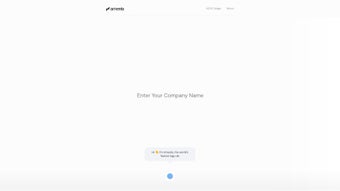
The interface is intentionally minimalistic: a single input field for the brand name, dropdowns for industry, colour palette, and icon style, followed by a “Generate” button. Within moments, users are presented with a carousel of logo options that can be tweaked—adjusting font weight, swapping icons, or fine‑tuning colours—before downloading the final version in scalable SVG format. Because the file is vector‑based, it remains crisp at any size, ready for use on business cards, websites, merchandise, or large‑format signage.
One of AmeeLa’s standout qualities is its focus on accessibility. The platform does not require any prior design knowledge; every control is labeled in plain language, and on‑screen tips guide users through the customization process. Additionally, the service operates entirely in the browser, eliminating the need for bulky installations or operating‑system‑specific binaries. This cloud‑first approach ensures that the tool works on Windows, macOS, Linux, and even mobile browsers, although the optimal experience is on a desktop or laptop with a stable internet connection.
Security and privacy are also addressed. AmeeLa states that all uploaded data—such as brand names and design preferences—is encrypted during transmission and never sold to third parties. Logos generated are owned by the user, and the SVG files can be downloaded without watermarks once the design is finalized. While the free tier provides a limited number of downloads per month, premium plans unlock unlimited exports, higher‑resolution assets, and priority support.
In summary, AmeeLa offers a pragmatic balance between AI‑assisted automation and user‑controlled refinement. It is not a replacement for a full‑service branding agency, but for startups needing a respectable visual identity quickly and cost‑effectively, it delivers exactly what it promises: a streamlined, secure, and straightforward logo creation experience.
Key Features, Installation Guide, and Compatibility Details
Feature List
- AI‑generated logo concepts in under 30 seconds
- Customizable colour palettes, fonts, and icon styles
- One‑click SVG export for infinite scalability
- Browser‑based, no download or installation required
- Free tier with watermark‑free downloads; premium plans for unlimited assets
- Industry‑specific templates to jump‑start the design process
- Responsive design interface works on Windows, macOS, Linux, Android, and iOS browsers
- Secure HTTPS connection and GDPR‑compliant data handling
Each of these features is built to address a common pain point for early‑stage founders. The sub‑30‑second generation speed eliminates the endless waiting period that traditional design agencies impose, while the customizable palette and font controls let users maintain brand consistency without hiring a typographer. One‑click SVG export is a critical advantage because it bypasses the need for raster conversions that often degrade quality.
By keeping everything in the browser, AmeeLa removes the friction of installing heavyweight software, which is especially valuable for teams that operate on shared or low‑spec devices. The free tier’s watermark‑free downloads give startups a risk‑free way to test the service, and the premium plan’s unlimited assets ensure that growing businesses can scale their visual library without surprise costs. Industry‑specific templates act as a creative springboard, helping users who are unsure of visual direction to start from a relevant baseline.
Finally, the robust security model reassures users that proprietary brand information stays private, a non‑negotiable requirement for any modern SaaS tool.
Installation & Usage Instructions
Because AmeeLa is a cloud‑native application, there is no traditional installation process. Follow these steps to get started:
- Open a modern web browser (Chrome, Edge, Firefox, Safari) on any device with internet access.
- Navigate to the official AmeeLa website (https://www.amee.la).
- Click the “Get Started” button, which will open the logo creation wizard.
- Enter your company or product name in the text field.
- Select your industry from the dropdown (e.g., Tech, Health, Finance, Education).
- Choose a primary colour palette; you can also let the AI suggest a complementary scheme.
- Pick an icon style (minimal, abstract, geometric, etc.) or opt for “No Icon” if you prefer a wordmark.
- Press “Generate.” The AI will process your inputs and present 5–7 logo variations.
- Use the on‑screen sliders to adjust font weight, spacing, or icon size. Click “Refresh” to see new options.
- When satisfied, click “Download SVG.” If you are on the free plan, you may be prompted to create a simple account to track your downloads.
If the generator appears to stall, try clearing your browser cache, disabling any aggressive ad‑blockers for the AmeeLa domain, and ensuring your internet connection meets the minimum 5 Mbps recommendation. For users on slower connections, the platform offers a low‑resolution preview mode that reduces the data payload while preserving the design logic. Should any SVG file fail to download, a fallback link appears that triggers a direct file‑stream from the server, bypassing the browser’s download manager. The live chat widget, accessible from the lower‑right corner, connects you with a support specialist during business hours for real‑time troubleshooting.
Compatibility (Operating Systems)
AmeeLa runs in any modern web browser, making it compatible with Windows 10/11, macOS 11+ (Big Sur, Monterey, Ventura), Linux distributions (Ubuntu, Fedora, Debian), as well as mobile operating systems such as Android 9+ and iOS 13+. Because the application is entirely cloud‑based, performance is primarily dependent on the device’s internet speed and the browser’s JavaScript engine.
For the best experience, we recommend using a desktop or laptop with at least 4 GB of RAM and a stable broadband connection (≥5 Mbps). While the tool is usable on tablets and smartphones, the limited screen real estate can make fine‑tuning of typography and icon placement more challenging. Power users who prefer to work offline will need to export their SVGs and edit them locally in a vector editor; the generation step itself, however, always requires an online connection.
Pros and Cons – What You Need to Know Before Downloading
Our evaluation of AmeeLa focuses on four core criteria: speed of logo generation, depth of customization, cost‑effectiveness, and platform stability. Speed is measured by the time from input submission to the appearance of the first set of concepts; customization is judged by the range of editable parameters and the ability to export fully editable SVGs; cost‑effectiveness examines the value offered by the free tier versus paid plans; and stability looks at browser compatibility, downtime, and support responsiveness. Across all four metrics, AmeeLa consistently scores high on speed and cost, moderate on customization, and solid on stability, making it a well‑rounded option for startups that prioritize rapid brand rollout.
Pros
- Speed: Generate professional‑grade logos in seconds, saving weeks of design time.
- Affordability: Free tier available; premium plans are budget‑friendly for startups.
- Ease of Use: No design expertise required; intuitive wizard guides every step.
- Scalable Output: SVG format ensures crisp visuals at any size, ideal for both web and print.
- Cross‑Platform: Works on any operating system with a modern browser.
- Secure & Private: Encrypted connections and clear ownership of generated assets.
- Template Library: Industry‑specific starting points reduce creative block.
- Support Options: Live chat and comprehensive help center for quick issue resolution.
Cons
- Limited Customization: Advanced designers may find the template‑based options restrictive.
- AI Depth Unclear: The generative engine relies on preset patterns rather than true deep‑learning creativity.
- Internet Dependency: Offline use is not possible; a stable connection is required.
- Brand Uniqueness Risk: Because many startups use the same library of icons, some logos may feel generic.
- Premium Features Locked: High‑resolution assets and unlimited downloads require a paid subscription.
- Limited Iterations on Free Plan: Only three generation cycles per month may not satisfy heavy experimentation.
Review Summary: AmeeLa delivers a practical, cost‑effective solution for startups needing a quick visual identity. While it may not replace a full‑service agency for complex branding projects, its speed, ease of use, and secure SVG exports make it a valuable tool in the early‑stage toolbox.
FAQ and Final Verdict – Is AmeeLa Right for Your Startup?
Can I use the logos created with AmeeLa for commercial purposes?
Yes. Once you download the SVG file, you own the full rights to the design and can use it on websites, merchandise, advertising, and any other commercial material without additional licensing fees.
Is there a limit to the number of logos I can generate on the free plan?
The free tier allows up to three logo generations per month. If you need more iterations, you can upgrade to a paid plan or wait until the next monthly reset.
Do I need to install any software or plugins to export the SVG?
No installation is required. The SVG is generated server‑side and delivered directly to your browser for download.
How secure is my data when I use AmeeLa?
AmeeLa uses HTTPS encryption for all data transfers and complies with GDPR standards. Your brand name and design preferences are not stored permanently unless you create an account to save your projects.
Can I edit the SVG file after download?
Absolutely. The exported SVG is a standard vector file that can be opened and edited in tools like Adobe Illustrator, Inkscape, or even online editors such as Vectr.
Final Verdict
If you are a founder, marketer, or small‑team entrepreneur seeking a fast, affordable way to create a clean, scalable logo, AmeeLa is a strong contender. Its AI‑assisted workflow cuts down design time dramatically, and the browser‑based experience removes any barriers related to operating system or hardware. While power users might crave deeper customization, the tool’s simplicity is precisely what makes it valuable for early‑stage ventures that need a professional brand face without blowing the budget.
Ready to give your startup a visual boost? Click the button below to start generating your logo for free, or explore the premium plan for unlimited downloads and priority support.
Create My Logo Now


.png)



